
The right Salesforce integration is the one your team can operate reliably. Compare how each option fits the workflow, handles exceptions and stays maintainable as the business changes.
Start with the workflow, not the tool
A connector, middleware platform and custom API integration are different ways to deliver an outcome. The useful first question is what should happen between your teams: which record starts the process, what approval is needed, what the receiving system should do and who checks the result.
Consider an Australian business using Salesforce for sales and an accounting system for invoices. “Sync our customers” leaves important decisions open. Should every new prospect become an accounting contact? What happens when an existing customer uses a different trading name? Who can change billing details? An agreed workflow gives you a way to assess the options.
Write a short requirement: “After finance approves the order, create or match the customer, create the agreed accounting record, and return its identifier and status to Salesforce.” Treat this as an illustrative starting point, not an invoice policy to copy without review.
Compare the three integration options
| Option | Useful starting point | Questions to resolve |
|---|---|---|
| Packaged connector | The vendor supports your systems and the required workflow is close to its standard behaviour. | Does it support your edition, fields, direction of sync and approvals? How are errors surfaced, and who fixes them? |
| Middleware | You need to coordinate several systems or maintain integrations through a shared platform. | Who operates it? What monitoring is available? Which subscriptions, usage charges and specialist skills apply? |
| Custom API integration | A specific process needs control or behaviour that packaged options do not provide. | Who owns the code and access? How are limits, retries, testing, documentation and future changes handled? |
This is a decision framework, not a ranking of tools. A hybrid design may be sensible: a connector can handle a standard flow while custom logic manages a particular approval or exception. The boundary between those components needs an owner.
Salesforce’s integration patterns distinguish different timing and data-access approaches. Those architectural choices should follow the requirements rather than a preference for one technology.
When a connector is a useful fit
Begin by demonstrating the exact workflow with representative test records. A product name on a marketplace listing is not enough to establish that the connector supports your accounting edition, custom fields, multiple entities or approval sequence.
Ask the provider to show an update, a duplicate, a failed record and a recovery. Find out whether configuration is sufficient or whether you are also commissioning custom development. Agree responsibility for the Salesforce configuration, the connector and the destination application.
A connector can be a practical choice when its supported behaviour matches the requirement and the operating arrangements are clear. Its convenience should not hide an unsupported edge case that your team encounters every week.
When middleware earns its place
Middleware is worth assessing when several systems share workflows or when the business wants a common way to transform, route and monitor information. The value depends on the platform’s capabilities and the team that will operate it.
Map who will see alerts, update mappings and manage access. Include subscription and usage assumptions in the estimate. A visual workflow editor can make some changes easier, but still needs testing and an understanding of what each system expects.
Also consider the existing environment. If your organisation already operates an integration platform effectively, using it may be more maintainable than introducing a separate custom connection. If no one owns that platform, buying it does not create an operating model.
When a custom API connection fits
A direct connection can be appropriate when the systems expose the required interfaces and a specific process needs behaviour that packaged options do not cover. It may also avoid adding a separate middleware platform for a narrowly defined requirement.
The project still needs access management, field mapping, limit handling, monitoring, tests and documentation. Decide who maintains the connection when an API, a business rule or a Salesforce configuration changes. Include a handover that another authorised person can use.
For finance workflows, start with the exact product. Our Salesforce–Xero guide covers the business decisions around that connection. For MYOB, confirm the product and edition first; our MYOB integration guide explains why product identity and data ownership matter.
Design the recovery before launch
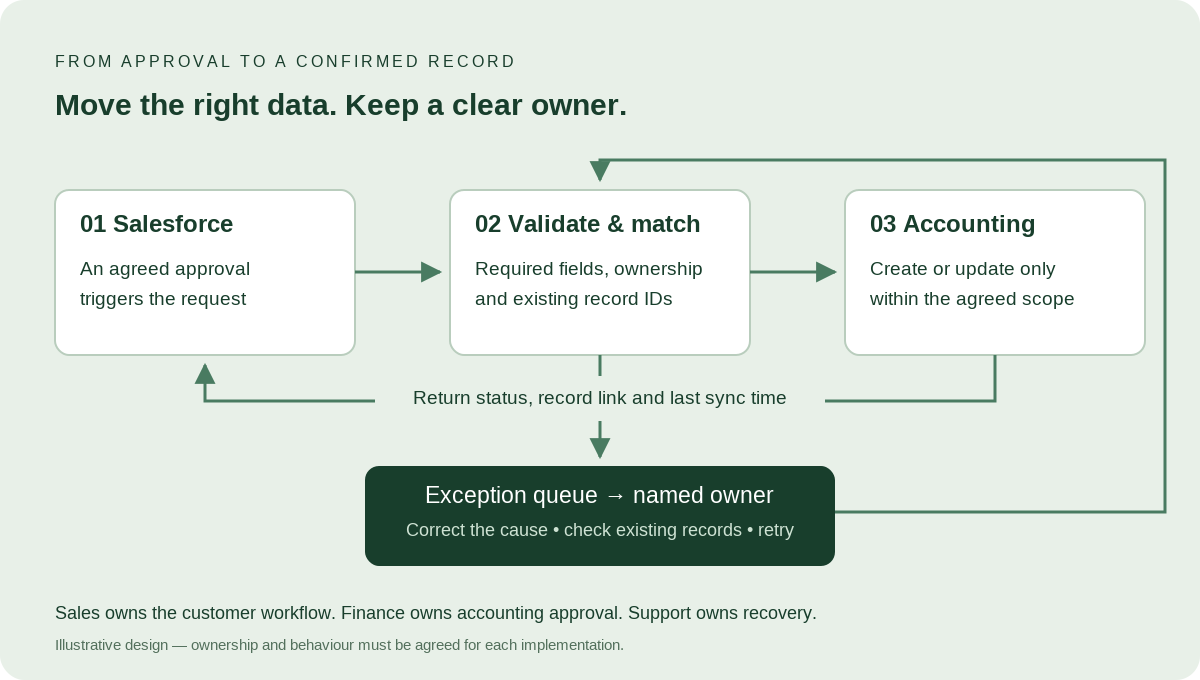
A connection is only part of the process. Someone needs to know whether the business outcome actually happened. Our recommended scope includes a visible status, a matched destination record and a named owner for exceptions.
Test an interrupted request. The destination may have created a record even if Salesforce never received the confirmation. A retry must check the identifiers or other supported duplicate controls before creating another record. Salesforce’s integration guidance discusses error recovery and safe repeated requests; the implementation depends on the selected systems.
- Sales or service owner: confirms the intended business event and fixes incorrect source details.
- Finance owner: confirms accounting rules, validation and reconciliation where finance records are involved.
- Technical support owner: investigates connection failures, restores access when appropriate and manages a controlled retry.
Document the escalation path when one team cannot resolve the issue. The same principles apply whether the connection is packaged, built in middleware or developed directly.
Compare the whole operating cost
Use the same scope when comparing proposals. A lower implementation price can exclude data cleanup, migration, monitoring or support that another proposal includes. Equally, a larger platform can provide capabilities you would otherwise need to develop.
| Cost area | What to include in the comparison |
|---|---|
| Initial delivery | Discovery, configuration or development, data preparation, testing, training and handover. |
| Ongoing operation | Connector or middleware subscriptions, applicable API/platform charges, monitoring and support. |
| Change | New fields, additional systems, API changes, higher volumes and regression testing. |
| Business workload | Time spent resolving exceptions, reconciling records and reviewing failed transactions. |
Estimate these over an agreed planning period using your expected volumes. There is no universal payback period or guaranteed licence saving. Review the actual product terms and access needs before including savings in a business case.
Look for evidence that matches your process
A relevant project example should explain what was connected and how it supported a working process. Adaptal’s published Titanium Caravans case study describes dealer quoting, PDF generation and DocuSign alongside sales and warranty workflows. It is evidence of that delivery scope, not proof of a particular accounting connector.
Bring the workflow you want to improve, the systems involved and a few anonymised examples. Our Salesforce integration services page explains how we approach scope, testing and ownership. If the connection is part of a wider CRM change, see Salesforce implementation; for an existing environment, see Salesforce support and managed services.
Published 25 November 2026 by Adaptal. The comparison is a planning framework; availability, product terms and delivery scope must be checked for your environment. Hero artwork is an AI-generated conceptual illustration.
Questions and answers
Is a connector the same thing as an API?
No. An API is an interface through which software can exchange information or request an action. A connector is a packaged implementation that uses interfaces to support particular workflows. Its field coverage and behaviour still need to fit your requirements.
Is a custom Salesforce integration always cheaper?
No. Avoiding a middleware subscription does not eliminate development, API charges, monitoring, testing or maintenance. Compare the full operating cost for your workflow and usage rather than assuming either approach is cheaper.
Can we combine connectors and custom development?
Yes. A packaged connection may cover standard records while a separately scoped component handles a specific requirement. Document the boundary and ownership so failures do not fall between suppliers.
Should every update happen in real time?
Only when the business needs it and the systems can support it. A scheduled update may suit some reporting needs, while a sales or service decision may need a more immediate result. State the acceptable delay and show users when information was last updated.
What should we provide before asking for an estimate?
Provide system names and editions, the workflow, required records and fields, approximate volumes, approval rules, current errors and a person who owns the business process. Use anonymised examples initially; production credentials are not needed for the first discussion.