
Connecting your Salesforce CRM to Slack is more than a technical task; it's a strategic move to break down information silos and accelerate your entire business cycle. From our experience as a Salesforce partner, a well-executed integration transforms daily workflows by bringing critical CRM data directly into the collaborative spaces where your teams solve problems and drive growth.
The Business Case: Why Connecting Salesforce to Slack Drives Growth

In most organisations, Salesforce is the central nervous system for customer data, while Slack is the heart of team communication. When these two powerhouses operate in isolation, a costly disconnect emerges. The business challenge is clear: sales teams miss crucial deal updates buried in CRM records, and service agents struggle to rally expert support for urgent customer cases.
This gap creates friction, slows down decision-making, and ultimately harms the customer experience. The goal of a Salesforce to Slack integration isn’t just about technology; it’s a direct Salesforce solution to these fundamental business challenges, fostering a more agile and responsive digital transformation.
Bridging The Gap Between CRM Data And Real-Time Action
Consider this common business challenge: a high-value opportunity is updated in Sales Cloud. Without integration, that update sits passively until a team member manually checks the record.
Now, consider the Salesforce solution: with the integration, an automatic notification is instantly pushed to a dedicated '#sales-wins' channel in Slack. This simple alert immediately informs the entire team, allowing account managers, leadership, and finance to react in real-time. This is the core benefit—it turns static CRM data into dynamic, actionable conversations. This shift from having to pull data to having it pushed to you is a game-changer for any business leveraging cloud solutions.
To fully appreciate this, it helps to understand What Is Slack and Why You Should Use It. When you view it as a core collaboration platform, it becomes clear why embedding live CRM data is so effective.
From Bottlenecks to Breakthroughs: A Project Comparison
Here's a look at the operational improvements and results we typically see in our Salesforce integration projects.
| Business Area | Common Challenge Without Integration | The Salesforce Solution With Integration |
|---|---|---|
| Sales Cycle | Delayed approvals stall deals while waiting for managers to log in to Salesforce. | Managers get instant Slack notifications with 'Approve' or 'Reject' buttons, accelerating the sales process. |
| Customer Support | Support agents manually search for experts to resolve complex Service Cloud tickets. | High-priority cases trigger alerts in an '#expert-support' channel, allowing specialists to swarm the issue immediately. |
| Team Morale | Big wins and key milestones are only visible to those actively inside the CRM. | A '#wins' channel automatically celebrates closed deals, fostering a shared sense of success and motivation. |
| Data Accuracy | Reps forget or delay updating CRM records after customer interactions. | Reps can update Opportunity stages or create Tasks directly from Slack, improving data hygiene and CRM adoption. |
This connected ecosystem fosters a more agile and responsive culture, turning potential operational bottlenecks into opportunities for breakthrough efficiency and automation.
Lesson Learned: From our project experience, the most impactful result is the reduction in "context switching." Teams no longer need to jump between applications to piece together a customer story. They have a unified view right within their collaborative workflow, which directly boosts productivity.
Ultimately, this integration empowers teams to swarm on high-priority support tickets, celebrate sales victories together, and make informed decisions faster than ever before.
Planning Your Salesforce and Slack Integration: A Partner's Best Practices
A powerful integration is born from a clear strategy, not a rushed setup. Too often, teams jump straight into connecting the apps, only to create a noisy, confusing system that gets ignored. Before linking Salesforce to Slack, taking time to plan your business goals is the single most important step.
This starts with getting the technical basics right.
- In Salesforce: The user connecting the platforms needs the ‘Customize Application’ and ‘API Enabled’ permissions. This is crucial for managing the connection and allowing data to flow securely.
- In Slack: You’ll need to be an Admin or Owner in your workspace to install and configure apps.
Nailing these settings first will prevent frustrating roadblocks later.
Define Your Workflows and High-Value Use Cases
With permissions sorted, the real strategic work begins. The core question is: what business processes are we trying to improve? Answering this means mapping out specific workflows that deliver immediate value. Resist the temptation to send every Salesforce update to Slack—that’s the fastest way to create notification fatigue.
Instead, focus on high-impact moments. A sales team might only need alerts when an Opportunity hits the ‘Proposal Sent’ or ‘Closed Won’ stage. A service team might only want notifications for high-priority cases from key accounts.
The infographic below outlines this planning flow, from checking permissions to mapping trigger events.
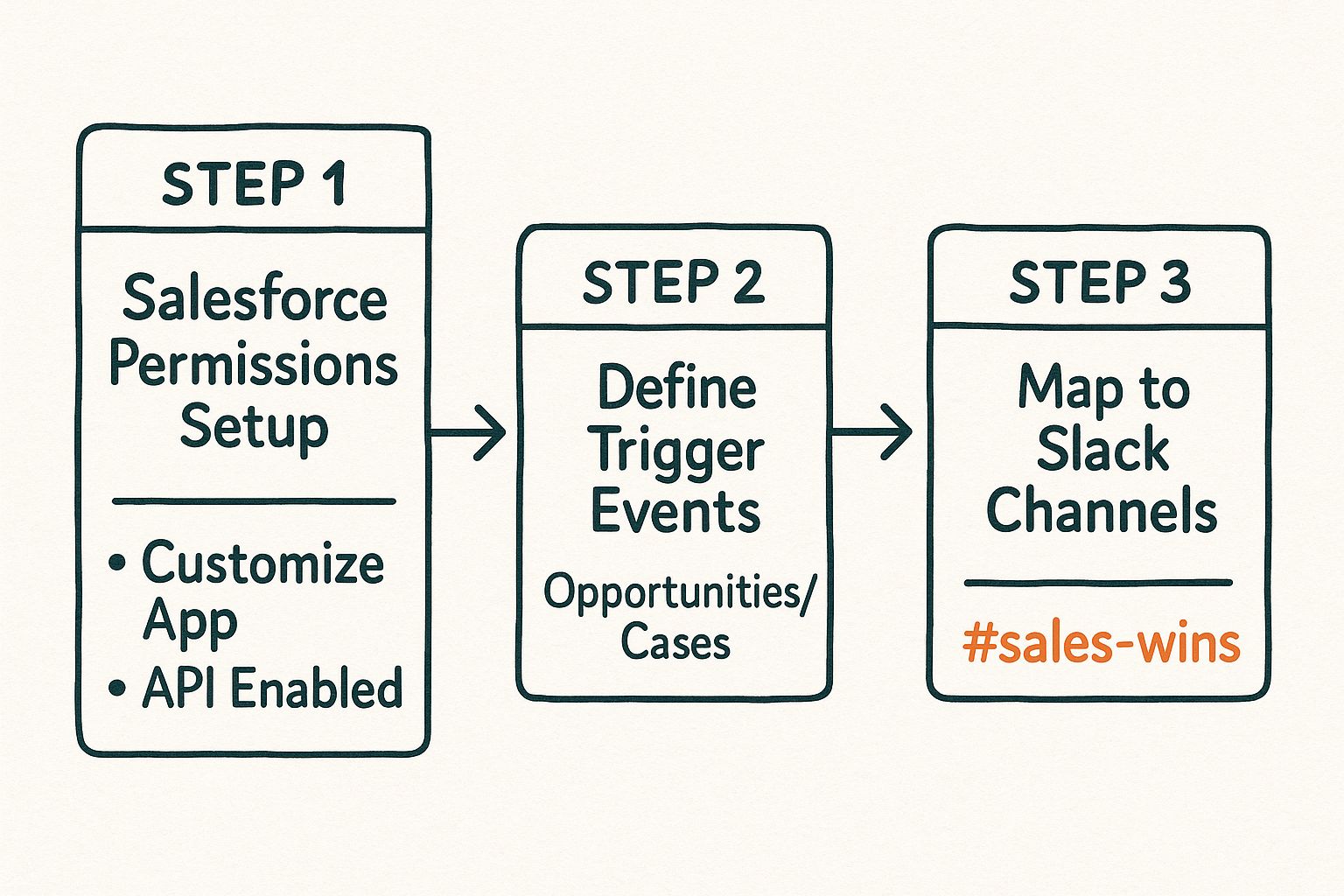
As you can see, a successful integration follows a logical path: start with the technical setup, then move into the business-focused workflow design.
Salesforce Tip: We’ve seen firsthand that organisations that define three to five key use cases before integrating see much higher adoption rates. Start small with a proven solution, demonstrate the value, and then expand.
Once you’ve locked in your trigger events, map them to the right Slack channels. A generic #salesforce-updates channel is a start, but you’ll get far more value from dedicated channels like #sales-wins for closed deals or #support-escalations for critical tickets. This targeted approach ensures the right information gets to the right people, turning your integration into a genuine productivity booster.
For a deeper look at structuring these initial steps, our Salesforce implementation guide for Australia offers frameworks to help shape your planning.
Connecting Salesforce and Slack Step-by-Step
With your strategy sorted, it’s time to connect these two platforms. We’ll walk through connecting the official Salesforce app for Slack, creating that vital bridge between your CRM data and your team’s conversations.
We’ll focus on a classic use case we often implement for clients: celebrating sales wins in real time to boost team morale and visibility.
The goal is simple: when a salesperson closes an Opportunity in Salesforce, a notification instantly appears in a dedicated Slack channel. This one automation turns an individual achievement into a win for the whole team.
Installing the Essential Apps
First, the connection hinges on two key applications. You'll need to install the Salesforce app into your Slack workspace and the Slack package into your Salesforce org.
- In Slack: Head to the Slack App Directory, search for "Salesforce," find the official app, and add it to your workspace, following the on-screen prompts.
- In Salesforce: Next, go to the Salesforce AppExchange. Search for and install the "Slack for Salesforce" package. This is the key ingredient that gives your CRM the power to communicate directly with Slack.
This is the official listing you should be looking for on the AppExchange.
Installing the package is a straightforward process that adds all the necessary components to your Salesforce org, paving the way for the custom automations you’re about to build.
Configuring the Connection and Authorisation
With both apps installed, the next step is to authorise the connection. Think of this as the digital handshake between the two systems—a crucial security step ensuring data flows only between your authorised Salesforce org and your Slack workspace.
From the Salesforce setup menu, find the Slack App settings. You'll be prompted to log in to your Slack workspace, which finalises the connection. A successful authorisation screen confirms Salesforce has the green light to post messages and perform actions in Slack on your behalf.
Getting this core integration right is fundamental for businesses across Australia, where streamlined cloud solutions are a necessity for digital transformation. The rapid growth in CRM adoption reflects a wider trend of companies looking for scalable ways to improve their services. You can get more insight by reading about Salesforce’s pivotal role in Australia’s digital evolution.
Setting Up Your First Automated Alert
Now for the rewarding part. With the connection live, you can build your first automated alert for our ‘#sales-wins’ channel.
- Trigger Condition: The alert will fire when an Opportunity's
StageNamechanges to 'Closed Won'. - Message Content: The message will pull key details directly from the Opportunity record.
Salesforce Tip: Always make your alert messages as useful as possible. Don't just announce a deal was won; provide context. Including the Opportunity Name, Amount, and the Account Executive's name gives everyone the key details at a glance.
Using Salesforce's built-in automation tools like Flow, you can configure the alert to look something like this:
"🎉 New Deal Closed! 🎉
Opportunity: [Opportunity Name]
Amount: $[Amount]
Owner: [Opportunity Owner Name]"
This entire configuration is managed inside Salesforce, giving you complete control over what information gets shared and when. By following these steps, you’ve built a powerful automation that directly boosts company culture and transparency—a perfect first step into a larger world of integration possibilities.
Building Advanced Automations with Salesforce Flow
Basic alerts are a great start, but to truly unlock the value of the Salesforce to Slack integration, you need to leverage Salesforce Flow. This is where you graduate from simple notifications to building interactive, multi-step automations that save your team significant time. As a Salesforce partner, this is where we consistently see clients achieve their biggest efficiency wins.
Instead of just notifying your team that something happened, you can empower them to take action directly from Slack. This simple shift massively reduces context switching, keeping everyone focused and productive.
Create Salesforce Records Directly from Slack: A Use Case
The Business Challenge: A service agent in a busy Slack channel identifies a conversation that needs to be logged as a formal customer case in Service Cloud. The old workflow involved stopping, opening Salesforce, creating a new Case, and copying details back and forth.
The Salesforce Solution: With Salesforce Flow, you can build a Screen Flow that launches directly from Slack.
- Launch Command: A user types a slash command like
/log-casein any channel. - Interactive Form: A simple form appears, asking for essential details—Contact Name, Subject, and Description.
- Automated Creation & Results: Once submitted, the Flow instantly creates the Case record in Service Cloud and posts a confirmation message back to the channel with a direct link to the new record.
This is more than a time-saver; it’s about capturing critical information accurately on the spot, ensuring nothing slips through the cracks.
Automate Actions with Interactive Buttons: A Use Case
Another powerful approach is using an auto-launched flow to not only send information but also request action.
The Business Challenge: A high-priority case is created in Service Cloud, requiring immediate assignment and acknowledgement.
The Salesforce Solution: A flow triggers the second a Case with a 'High' priority is created. It sends a detailed message to a dedicated #support-escalations channel, but the message includes interactive buttons.
Lesson Learned: From our project experience, adding action buttons like 'Accept Case' or 'Escalate to Tier 2' turns a passive notification into a dynamic workflow. When a team lead clicks 'Accept Case', the flow can automatically update the Case Owner field in Salesforce, timestamp the action, and post a threaded reply in Slack saying, "Case accepted by [User Name]."
This creates a crystal-clear audit trail and assigns ownership in seconds. For more complex scenarios, you can even design flows that handle attachments. We've put together a guide on how to expose a file via Salesforce Flow that can enrich these automations.
By moving beyond simple alerts and embracing Salesforce Flow, you empower your teams to work smarter. You're not just connecting platforms; you're building a responsive, automated engine that drives business processes forward from the collaborative tools your team already uses.
Proven Use Cases and Integration Best Practices
You've got the technical side sorted. But where does the real business value come from in a Salesforce to Slack integration? From our experience with countless Salesforce projects, the magic happens when you tailor the integration to solve specific, real-world problems.
A classic case study is with customer support teams using Service Cloud. They can "swarm" high-priority issues. When a critical case is logged, an automated alert fires in a #support-tier3 Slack channel, pulling in senior agents and product specialists. They can collaborate and share files in a Slack thread, which can then be logged back to the Salesforce record, creating a complete audit trail without context switching.
Marketing teams using Account Engagement (formerly Pardot) can also gain a massive speed boost. Instead of waiting for a daily report, an alert can pop up in a #new-leads-hot channel the second a prospect with a high lead score fills out a form. A sales rep can then engage that lead within minutes, dramatically increasing the odds of conversion.
Fine-Tuning Your Integration for Success
A powerful integration can quickly become noise if you're not careful. The goal is to deliver a clear signal, not more static.
Salesforce Tip: The most common mistake we see is over-communication. A successful integration isn't about sending every update to Slack; it’s about sending the right updates to the right people at the right time.
To get this right, establish clear best practices from day one:
- Be Selective with Alerts: Focus on critical changes, like an opportunity moving to a key stage or a case being escalated.
- Create Dedicated Channels: Use specific channels like
#contract-approvalsor#project-milestonesto ensure notifications are always relevant. - Embrace Slack Threads: Encourage your team to discuss alerts within threads to keep the main channel clean and conversations organised around specific Salesforce records.
Smart governance and ongoing training are what make a Salesforce integration stick and scale. You can see how we apply these principles by exploring some of our Salesforce case studies with Australian businesses.
The future of this integration is getting even smarter. Salesforce, for example, launched Agentforce, an AI agent in Slack to help employees find answers and complete actions. They project this will save around 500,000 work hours annually, showing how AI is being embedded directly into collaboration tools to drive digital transformation.
If you're looking to implement more advanced strategies, checking out a complete guide to AI lead generation tools can show you how these technologies hook into Salesforce and Slack to build powerful sales automation workflows.
FAQ: Your Salesforce to Slack Integration Questions Answered
When businesses in Australia look to connect Salesforce and Slack, we tend to hear a lot of the same questions. Drawing from our hands-on experience as a Salesforce partner, we've put together answers to the most common queries.
Is This Integration Free To Use?
Yes, the core app is free. You can install the official Salesforce app from the Slack App Directory and the corresponding Slack package on the Salesforce AppExchange without any charge. However, you will need the appropriate user licenses for both Salesforce and Slack. Costs may arise if you implement complex, custom automations that require third-party tools or additional Salesforce features.
Can I Connect Multiple Salesforce Orgs to One Slack Workspace?
Absolutely. This is a common requirement for larger businesses with separate Salesforce instances for sales and service. You can connect multiple Salesforce orgs to a single Slack workspace, but it requires thoughtful management. Each connection must be authorised separately, and we recommend creating a clear channel naming system (e.g., #sales-org-wins, #service-org-cases) to keep alerts organised.
What Is the Difference Between Standard Alerts and Salesforce Flow?
Standard alerts are the out-of-the-box notifications, perfect for simple, one-way updates like broadcasting a closed deal. They are straightforward announcements. Salesforce Flow, on the other hand, is where you build interactive, multi-step workflows. With Flow, you can create records, update fields, and add action buttons inside a Slack message. This turns a simple notification into a dynamic, two-way process, unlocking the true potential of your Salesforce to Slack integration.
Salesforce Best Practice: As a Salesforce partner, we advise clients to start with standard alerts to prove value quickly. Once the team sees the benefits, we graduate to powerful Flow automations to solve more complex business challenges.
How Does This Integration Handle Security and Permissions?
Security is baked in by respecting the permissions already set up on both platforms. A user in Slack cannot see or do anything with a Salesforce record unless their Salesforce profile grants them that access. The integration is a window, not a backdoor. All data transmitted between Salesforce and Slack is encrypted, and you have full control over which specific fields are shared, ensuring sensitive customer data stays secure within your CRM. For more on platform security, you can visit our Adaptal FAQ page.
This focus on productivity aligns with modern workplace trends. Recent research shows that 46% of Australian workers now use AI, with daily users reporting a 64% jump in productivity. By automating routine tasks, the Salesforce and Slack connection is a key part of this drive for smarter, more efficient work. You can discover more insights on AI adoption in Australia.
Ready to bridge the gap between your CRM and your team's conversations? Adaptal is the trusted Salesforce partner that helps Australian businesses build seamless, high-impact integrations that drive real results. Contact us today for a consultation and let's discuss how we can unlock new levels of productivity for your team.